
Editing videos the old way feels outdated. If you spend hours in After Effects or Premiere, you’re losing ground fast. Content drives growth for creators and businesses alike, but you need it quick to stay ahead.
Traditional editing drags you down. You either handle it solo and burn weeks, or hire help that delivers junk on the cheap or delays at a high price. This trap costs more than cash—it steals time and chances to build your brand. Creators hit walls here, stuck while others race past.
AI changes the game for video editing. These tools handle tough tasks like cuts and captions, so you get pro results without the hassle. You focus on ideas, not pixels, and pump out more work to reach bigger crowds.
I tested four top AI video editors: Captions.ai, Vit, Submagic, and Opus Clip. We compared them on ease of use, repurposing skills, editing power, and cost. By the end, you’ll see which one fits your needs and boosts your output.
Table of Contents
Initial Assessment: Ease of Use and Interface Depth
Getting started matters a lot with AI video editors. You want something simple that doesn’t slow you down. Let’s see how these tools stack up right from the login screen.
Captions.ai: Intuitive Simplicity
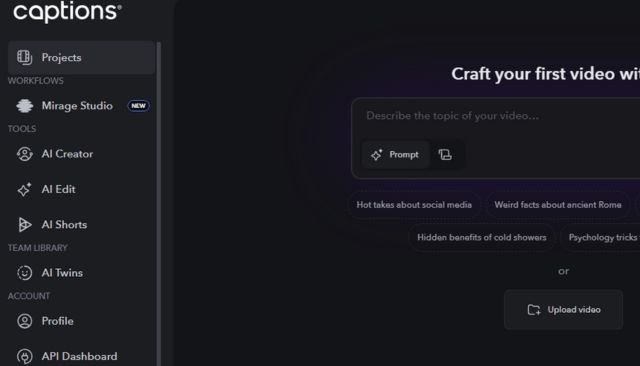
Captions.ai keeps things clean and straightforward. You log in and describe your topic or upload a clip right away. The left menu lists features like AI editing and shorts creation, skipping fancy extras for now.
It skips the clutter, so new users jump in fast. You won’t hunt for buttons or read manuals. For pure ease, Captions.ai earns five stars—it’s that smooth.
This setup shines if you hate learning curves. But it stays basic, which we cover later. Overall, it feels welcoming from the start.
Veed: Depth Over Smoothness
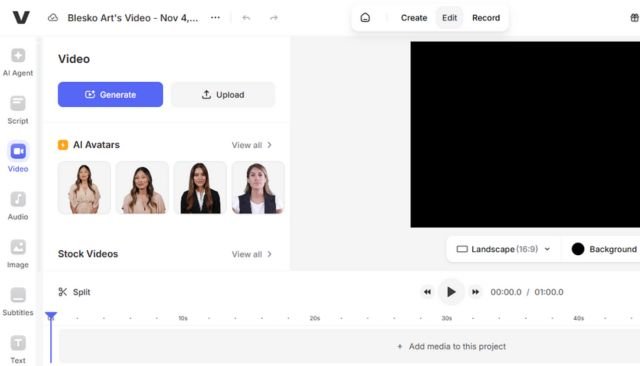
Veed greets you with templates, brand kits, and asset libraries on the left. The middle shows a workflow with AI apps, including auto-editing based on quick inputs. It’s busier than Captions.ai, but editing and clipping stay simple.
You get more options, like customizing shorts a bit. That adds power without total confusion. I rate Veed four out of five here—usable with extra layers.
If you need depth, this tool fits. It might overwhelm at first, though. Still, core tasks flow well once you settle in.
Submagic: Purpose-Built for Repurposing
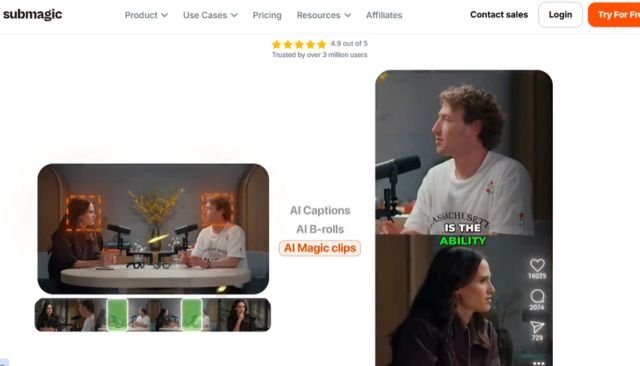
Submagic zeros in on clips and reuse. The dashboard lets you make captions, pull shorts, or grab magic clips from long videos. It adds B-roll, fixes eye contact, cleans sound, and translates text—all in a tidy space.
No extra fluff slows you down. You figure it out in minutes. That’s why it scores five out of five for ease.
This design suits quick repurposing jobs. If that’s your main gig, you’ll love the focus. It keeps editing straightforward too.
Opus Clip: Feature-Rich Initial Experience
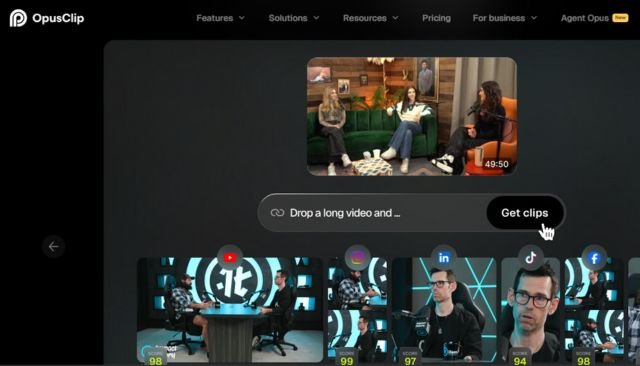
Opus Clip opens with a clean window and shortcuts for captions, editing, and more. Drop a link from YouTube, Rumble, or even Zoom, and it works. Left side holds brand templates and assets, plus analytics to track performance.
You connect accounts to see what clips hit big. A calendar lets you schedule posts across platforms with one click. These extras make it powerful, but a tad busier, so four out of five for ease.
It stands out for pros who want data and automation. Beginners might need a moment to explore. Once you do, it clicks fast.
Submagic and Captions.ai lead for simplicity, great for quick starts. Veed and Opus Clip offer more, which pays off later. Pick based on how much you want under the hood.
Head-to-Head: Core AI Video Editing Capabilities
Now we dig into the real work: editing with AI. These tools promise to cut the grind, but how do they deliver? We tested each on a sample video to check results.
Captions: Templating, Not True Editing
Start with Captions.ai’s AI edit tool. It takes vertical videos only—horizontal ones need another app. Pick a template, set a color like green, and create the project.
AI adds sounds, music, images, or voiceovers via prompts. Auto tools fix noise and eye contact, but that’s it. You mostly cut captions or swap styles, more like filling a template than full edits.
The output looks okay—clean but basic. No deep changes possible. For editing power, two out of five stars; it templatizes well but limits creativity.
Think of it for simple social posts. If you need flexibility, look elsewhere. Results won’t wow, but they work in a pinch.
Veed: Robust Magic Tools Suite
Veed handles both vertical and horizontal uploads. Click edit, add your file, then hit magic tools for AI help. Clean audio, ditch filler words, cut silences, or add B-roll that matches your talk.
Eye contact correction and magic cut remove bad parts too. Touch up faces, swap backgrounds, or add green screens. It’s a full kit for quick polishes.
I added B-roll, fixed audio, and turned on subtitles—the video popped. Export showed solid work. Four out of five; strong tools with room to grow.
This beats basic fixes. You get pro touches without sweat. Great for everyday creators.
Submagic: Focus on Visual Enhancements
Submagic imports horizontal videos easily. It auto-transcribes on the left, so you remove silences or bad takes fast. Switch to brand for images and text, then captions for styles like Horoszi.
The star is B-roll: add magic clips or videos, plus zooms for dynamic feel. Hit AI for eye contact and audio cleanup. The layout feels off sometimes, but output improves the original.
No weird pauses, nice effects, and sharp subs. It shines on visuals. Three and a half out of five—good results, but workflow could smooth out.
Use it for eye-catching shorts. The enhancements add punch. Just expect minor interface quirks.
Opus Clip: Advanced Enhancement and Professional Output
Upload to Opus Clip via link or file—it opens a smart workflow. Transcribe text lets you tweak, and the tracker keeps you centered if you move. AI enhancements remove fillers, pauses, or even censor swears.
Boost speech for richer sound. Pick AI B-roll for custom fits or stock for quick wins. Add hooks with voiceovers, emojis, transitions, and speaker highlights.
Captions come in styles you can shift or effect up. Preview changes live, add music, and export as HD or XML. The result? Clean, pro YouTube-ready with fitting B-roll and smooth fades.
It looks edited by a team. Four and a half out of five—top for features and polish. This tool elevates your work fast.
Opus Clip edges Veed here with smarter options. All handle basics, but depth varies. Choose what matches your edit style.
Repurposing Power: Generating High-Performing Short-Form Content
Short-form rules now—think TikTok or Reels. Good AI tools turn long videos into viral bites. We tested base outputs, no extra edits, on clip quality and smarts.
Captions: Basic Clipping with Time Lag
In Captions.ai, hit AI shorts and upload or link (YouTube only). Set language, template, and length like 30 seconds. It generates, but waits feel long.
You get five clips, each okay with decent fonts. Hooks lack punch after the first. No easy sort for best ones.
Three out of five—usable but slow and basic. Fine for simple needs. Won’t stand out in feeds.
Veed: Rated Clips with Questionable Accuracy
Veed’s AI clips let you pick goals like viral shorts, size, language, and length. Choose fonts, then generate fast. It rates for flow, hook, interest, and engagement.
Clips come quick, sorted by scores. But ratings seem off—some high marks don’t hook well. Selection feels average.
Three out of five, same as Captions. The ratings help, but accuracy doubts hold it back. Try it for speed.
Submagic: Accurate Rating, Repetitive Variety
Paste a link in Submagic’s magic clips, pick language, duration, and caption theme. It spits out options with real-feeling ratings. Clips look decent, but many repeat with small trims.
Better judgment than Veed’s guesses. Variety could improve, though. Four out of five for solid accuracy.
This tool nails quick pulls. Use ratings to pick winners. Repetition is the main flaw.
Opus Clip: Viral Scoring and Smart Curation
Drop a link in Opus Clip—it auto-generates without clicks. It pulls smart clips, skips duplicates, and scores on viral potential from real data. Switch clips easy, download or schedule posts.
Hooks grab attention better. Top ones feel ready to share. Five out of five—best quality and extras.
Analytics tie in for tweaks. This curates winners. Perfect for scaling shorts.
Opus Clip dominates repurposing. It smartly boosts your reach. Others lag in smarts and speed.
Pricing Structure and Value Proposition Analysis
Cost counts when tools promise big saves. We break down plans and what you get. Value ties to features versus dollars.
Captions: High Cost for Limited Core Functionality
Captions.ai starts at $10 monthly for basic access like styles. But you need the $25 plan for real use. It doesn’t match editing power.
Two out of five—too much for basics. Skip if you edit heavy. Better for light templating.
Veed: Expensive Barrier to Entry
Veed’s light plan at $20 drops watermarks and ups limits. Pro at $50 adds resolution, languages, and AI clips—must-have for most. It adds up quick.
Two out of five; steep for full access. Good tools, bad entry price. Weigh if you need all.
Submagic: Modular Pricing Strategy
Base at $19 covers no watermarks, trims, and basics. Add $19 for magic clips—$38 total. Output justifies more than rivals.
Three and a half out of five—fair for quality. Modular fits needs. Not the cheapest, but worth it.
Opus Clip: Superior Features at Competitive Rates
Starter $15 packs plenty for most. Pro at $29 gives 300 minutes monthly, flexible credits. Best bang for buck.
Four and a half out of five—top value. Matches top results low cost. Scale without waste.
Opus Clip wins pricing too. It balances features and savings best.
Conclusion: The Clear Winner for Scaling Content Velocity
Final Report Card Summary
Opus Clip tops the chart. It scores high in editing (4.5), repurposing (5), ease (4), and price (4.5). Veed hits 4 in editing but lower elsewhere. Submagic shines in repurposing (4) and ease (5), at 3.5 overall. Captions.ai lags at 2-3 across, best for basics only.
This spread shows Opus Clip’s edge. It wins key spots like editing and shorts.
The Competitive Edge: Content Volume Over Manual Precision
Old editing gives a few videos weekly. AI like Opus Clip makes 20 in minutes. You schedule across platforms, filter trends, and grow fast.
No more editor waits or burnout. More content means more views and cash. That’s the real win.
Actionable Next Step: Implementing AI for Growth
Grab Opus Clip via the link below. Start with a test video and watch your output soar. Ditch the old tools—scale your content now and pull ahead.